Minesweeper
About Minesweeper
Minesweeper is the old logic puzzle of careful deduction: a grid of covered squares hides a number of mines, and your job is to uncover every safe square without setting one off. Each square you open shows how many of its eight neighbours hold a mine, and those little numbers are all you need to work out where it is safe to step next. This free online Minesweeper runs in your browser on phones, tablets and computers with no download. Your first tap is always safe and always opens a clear patch of ground, so every game starts with real information instead of a blind guess. Choose Easy (9×9 with 10 mines) for a relaxed few minutes, Medium (12×12 with 24 mines) for a proper workout, or Hard (16×16 with 44 mines) when you want a real fright. On a phone, tap to open a square and press and hold to plant a flag, or switch on Flag mode so every tap places a flag. On a computer, left-click opens and right-click flags. Experienced players will appreciate chording: tap a number whose flags are all in place and every other neighbour opens at once, which keeps fast games flowing. A ripple animation shows each area as it opens, and the timer and mines counter keep you honest. Stuck on a pure fifty-fifty guess? Watch a short ad for a hint that safely opens a useful square, or use your one second chance per game to survive a wrong step. Your best time for each level is saved, so you can keep pushing it down.
How to play
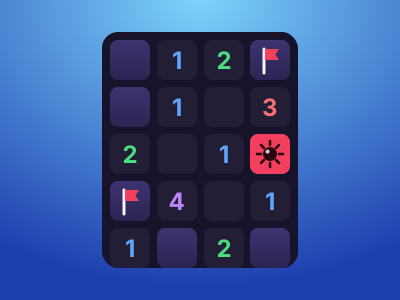
Tap or click a square to open it. A number tells you how many mines touch that square, including diagonals; an empty square means none, and its neighbours open automatically. Press and hold (or right-click, or use Flag mode) to mark a square you are sure is a mine. Tap a number that already has the right number of flags around it to open all its other neighbours. Open every square that is not a mine to win. Opening a mine ends the game unless you use your second chance.
Questions
Is the first click always safe?+
Yes. The mines are placed only after your first tap, never on or next to that square, so the game always starts by opening an area.
How do I place a flag on a phone?+
Press and hold a square, or turn on Flag mode with the flag button so that every tap places or removes a flag.
What is chording?+
When a number already has that many flags around it, tapping the number opens all of its remaining neighbours at once. A wrong flag will set off a mine, so be sure first.
What sizes can I play?+
Easy is 9×9 with 10 mines, Medium is 12×12 with 24 mines and Hard is 16×16 with 44 mines.
Is this Minesweeper free?+
Yes, it is free to play in your browser. Optional short ads give you hints or a second chance.